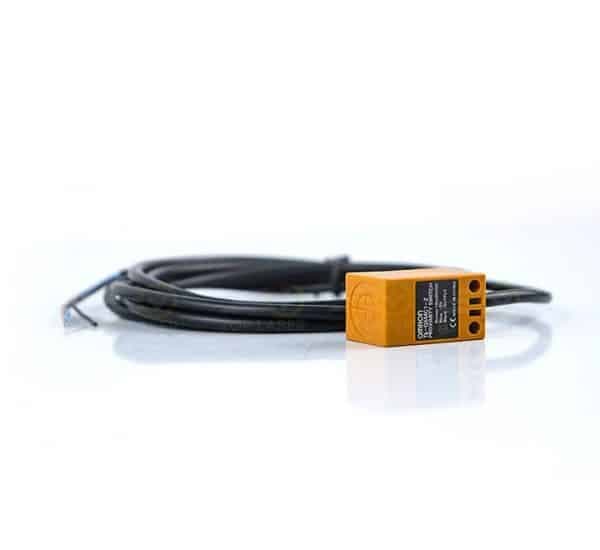
Limit switch
Description
The limit switch gives each axis of a CNC router or laser machine a fixed reference point. At start-up the axis travels until it trips the switch, letting the controller know exactly where the carriage sits. It also stops the motor from driving the gantry or head beyond its permitted travel.
To test one, cut the power and check continuity across its terminals with a multimeter while pressing and releasing the actuator; a switch that clicks but shows no change in reading has failed internally. False triggers can also come from a broken wire inside the cable chain. After fitting a new one, run the homing cycle and confirm the trigger point before starting a job.
Note how many wires leave the switch, how it is fixed and the spacing of its mounting holes, and its style: roller lever, plunger or proximity sensor. Bring the old part to the Shubra outlet, or send its details to any Top Laser branch so it can be matched.
Contact us
Related Spare Parts
Why choose us?

Integrated maintenance team

One year warranty

Spare parts

Immediate receipt
Our branch
- Egypt - Cairo: Head Office2 Sadr El-Din Street, Khalafawy Square, Shubra
- Egypt - Spare Parts Outlet20 Al-Galaa Street – Shubra Masr, Cairo
- UAE - Ajman BranchAl Jurf Industrial 1 – Behind the Chinese Market
- Dubai BranchSheikh Zayed Road – Al Garhoud
- Jeddah BranchSitteen Street and Palestine Street – Al Sharafiyah
- Dammam Branch18th Street and Al-Mustashfa Street – Al-Qazzaz
- Riyadh BranchAl-Salihiyah – Al-Wasat Commercial Complex, Block No. 5